How Building Compliance Software Supports CRE Property Management
Key takeaways:
Building compliance software creates a structured, traceable system for managing inspections, COIs, permits, and safety tasks.
These platforms organize the steady flow of compliance data and surface the tasks, timelines, and risks that guide daily CRE decision-making, helping teams stay aligned with regulatory expectations across a portfolio.
Visitt supports this work with integrated workflows, digital inspections, automated reminders, and AI-driven COI validation, giving teams clearer visibility and more consistent compliance performance across every building.
What is building compliance software?
Building compliance software is a system that centralizes the regulatory, safety, and documentation requirements that apply to buildings. It assigns structure to how permits, certifications, inspections, and safety records are handled, from scheduling and documentation to corrective action, with time-stamped activity that shows what was completed, when, and by whom. This gives CRE firms a more consistent and reliable compliance record and clearer protection against operational and audit risks.
Different building types require different types of oversight, including within commercial real estate (CRE) property management:
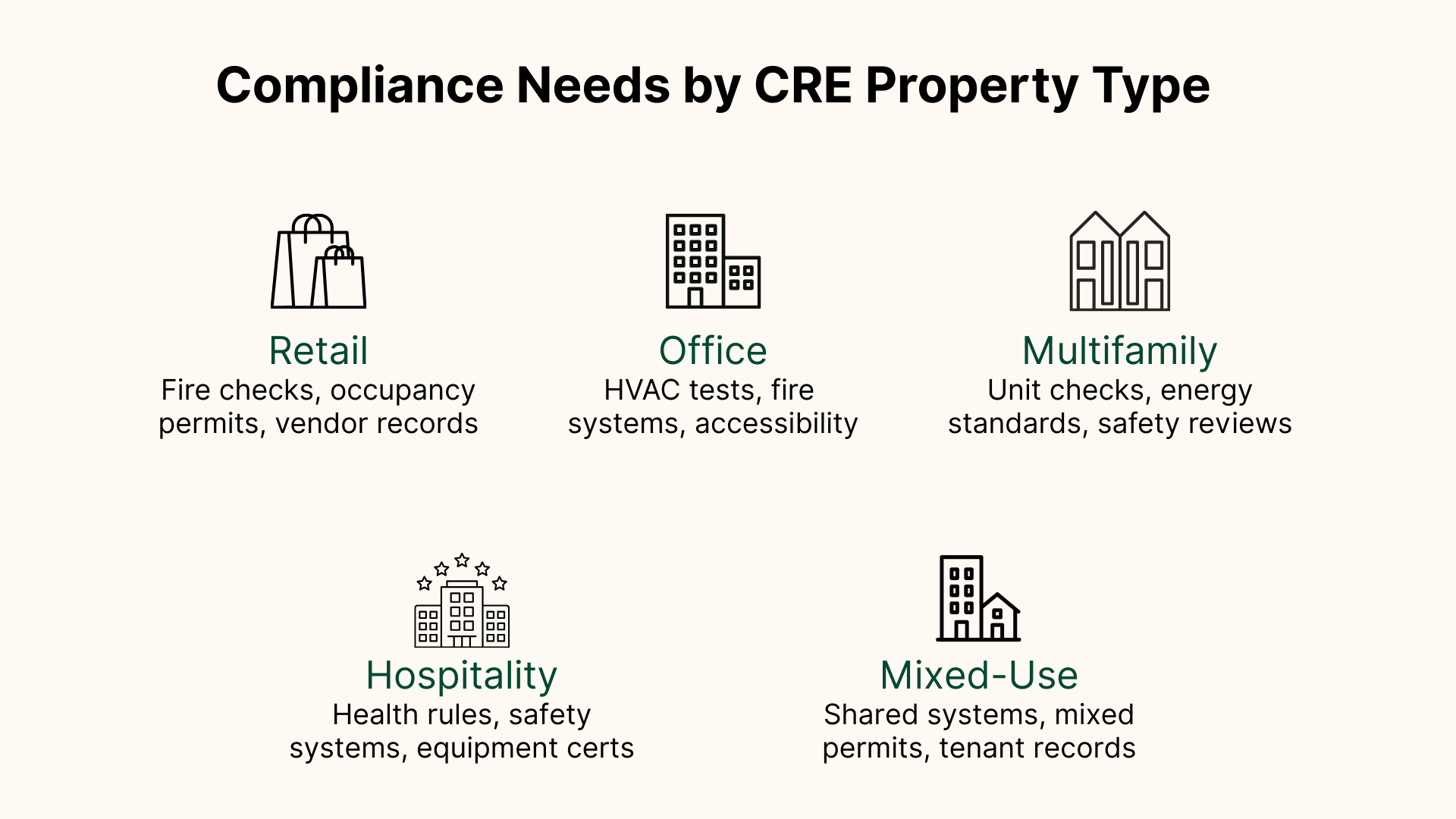
- Retail and office: oversight for common areas, essential equipment, and accessibility requirements
- Multifamily: added residential needs, recurring habitability checks, and unit-level documentation
- Hospitality: continuous standards for guest-facing spaces and round-the-clock operations
- Mixed-use: combined systems, overlapping regulatory cycles, and coordinated oversight across uses
Building compliance software keeps compliance data organized across portfolios and connects them to the assets, vendors, and tasks that support compliant daily operations thanks to:
- A library for permits, licenses, certifications, and regulatory records
- Scheduling for recurring commercial property inspections and long-term compliance cycles
- Mobile checklists with photos, notes, and signatures
- Alerts for expiring documents and missed steps
- Corrective-action routing linked to work orders
- Exportable records for insurers, auditors, and authorities
Because compliance activity touches nearly every operational workflow, many firms connect these tools with work order management, a CMMS, AI property management software, resource management software, tenant communication tools, and property compliance software. This keeps each requirement tied to the teams, assets, and vendors responsible for the underlying work.
Who uses building compliance software?
Building compliance software is used by the different teams responsible for keeping a property aligned with its regulatory, safety, and documentation requirements.
- Property managers and CRE operations teams coordinate inspections, COIs, permits, certifications, and renewal cycles
- Facility managers and engineers document maintenance and compliance work for internal stakeholders, insurers, and external auditors
- Owners and asset managers track risk exposure, open issues, and compliance status across the portfolio
- Fire, access, and energy assessors perform specialized inspections and verify corrective actions
- Environmental, health, and safety teams manage safety checks, training records, and incident logs
How is building compliance software different from construction compliance software?
Building compliance software is often confused with construction compliance software because both manage inspections, documentation, and regulatory tasks through structured workflows. The overlap can make them appear interchangeable, but the users, timelines, and regulatory expectations are not the same.
Why does your CRE firm need building compliance management software?
Compliance in CRE spans a constant flow of inspection logs, COIs, equipment service histories, environmental records, and lease-driven requirements that must be verified, timestamped, and retrievable. As portfolios grow and jurisdictions differ, maintaining this through spreadsheets introduces blind spots that affect insurance readiness, lender reporting, capital planning, and tenant safety. A single missing COI renewal or unverified life-safety inspection can stall operations or force costly corrective work, especially in buildings with complex mechanical systems or high vendor turnover.
Across compliance-heavy sectors, firms are adopting software and AI as part of larger compliance and risk management strategies. A global study by White & Case shows that more than a third of organizations already use AI in compliance, with the most common applications involving reviewing and interpreting large text sets—similar to how CRE teams handle inspection notes, coverage requirements, and audit documentation. Commercial building compliance software uses PropTech to apply these capabilities to property operations, giving teams structured data, clearer visibility, and more consistent decision-making across a full portfolio.
Simply put, those who adopt are better positioned to comply, creating a competitive advantage; those who don't are equally positioned to fail audits, be fined, and turn tenants and their customers away.
How to choose building compliance software for your CRE firm
CRE teams need commercial building compliance software that supports inspections, COIs, recurring tasks, vendor work, and the documentation that follows each step.
- Confirm the software covers your full compliance scope so all required checks follow the right workflow.
- Check how well it fits into daily operations so compliance tasks move naturally with maintenance and vendor work.
- Ensure field teams can use it easily on-site with tools suited to real inspection work.
- Look for AI and automation capabilities that organize and infer from data to improve compliance-focused decision-making.
- Confirm the reporting is clear and audit-ready for internal and external reviews.
- Make sure it gives portfolio-level visibility across buildings, vendors, and assets.
- Choose a platform that can grow with your portfolio as needs and requirements expand.
How is building compliance software used across CRE?
Running recurring inspections that satisfy regulatory standards
Operators use the software to plan and document inspection cycles for fire protection, elevators, emergency lighting, boilers, generators, and accessibility routes. Inspections completed on-site feed into a continuous record of system performance that insurers, auditors, and authorities depend on.
This typically includes:
- Capturing photos, meter readings, and condition notes
- Linking each entry to the exact asset and regulatory rule
- Creating a verified timeline of inspections and outcomes
Managing COIs, permits, and lease-driven documentation
Tenant insurance, vendor COIs, environmental permits, and accessibility certifications all carry specific coverage requirements and renewal timelines. The software tracks the documents and the conditions attached to them, so teams can:
- Check whether a COI meets the lease's required limits
- Monitor upcoming permit renewals
- Route requests to tenants or vendors and track responses
Converting compliance findings into structured maintenance work
When inspections reveal issues such as blocked egress paths or declining mechanical systems, the software turns those findings into clear maintenance tasks with all supporting evidence attached. Over time, the accumulated inspection records and service histories also show patterns that help teams understand where predictive maintenance and preventative maintenance should be performed.
Teams rely on this process to:
- Maintain compliance between audit cycles and renewal deadlines
- Protect building valuation by keeping safety and mechanical systems in stable condition
- Support a more reliable tenant experience through fewer service disruptions
Preparing audit-ready evidence for insurers, lenders, and internal reviews
Audit cycles require complete, verifiable documentation, often across several building operations and systems at once. The software organizes every inspection, COI, permit, service log, signature, and corrective-action record into a searchable structure tied to the relevant asset or space.
This helps teams:
- Respond quickly to insurance or lender requests
- Produce regulatory documentation without reconstruction
- Maintain consistent, defensible records across the full portfolio
Using historical compliance data to support capital planning
Across a portfolio, inspection histories often reveal performance trends that inform long-term budgeting. Repeated elevator shutdowns, mechanical equipment that regularly fails testing, or aging safety devices that cannot hold calibration all point to upcoming lifecycle spending.
Teams rely on the software to:
- Compare asset conditions across multiple buildings
- Identify systems approaching end-of-life
- Prioritize replacements and multi-year capital projects
What building compliance processes look like with Visitt
A unified compliance solution gives teams a consistent way to manage requirements and reduces the gaps that often appear during audits or renewals. That's exactly what Visitt achieves by centralizing inspections, certifications, permits, safety checks, and COIs and tying them to the spaces, assets, tenants, and vendors involved. Automated schedules keep recurring tasks on time, and customizable reminders reach the right groups before deadlines. If an inspection fails or a document expires, the system can create a work order and track the corrective work.
COIs follow a clear structure with upload, versioning, and requirement rules built in. Automated outreach supports renewals, whiledashboards show upcoming deadlines and exposure across the portfolio. Meanwhile, Visitt's COI AI agent interprets lease requirements, validates certificates against those rules, and pinpoints any missing coverage or incorrect limits. It eliminates the manual back-and-forth that typically slows COI review, reduces the risk of unnoticed exposure, and ensures every certificate that enters the system is consistently checked and documented for audits.
And if that weren't enough, photos, videos, notes, signatures, and activity logs are collected automatically, ensuring records are always ready for audits or insurer reporting. In this way, compliance tasks move alongside work orders, preventative maintenance, tenant operations, visitor access, and vendor management, keeping daily operations aligned.
See what smarter CRE building compliance can do for your portfolio